Archive for the ‘Brands’ Category

LG monitors at the PC Show 2011

Thursday, June 9th, 2011

I had the chance to try out the 23-inch LG2360V LED LCD monitor for the past two weeks. Pretty bright and pin sharp display, and easy to set-up.

I’ll be doing a more in-depth review when I get back from Germany at the end of the month. For now LG’s promoting their monitors at the ongoing PC Show. The LG2360V is going for S$298 along with some free gifts.

LG monitors on promotion at the PC Show 2011

LG monitors on promotion at the PC Show 2011

BlackBerry PlayBook launched in Singapore

Wednesday, June 8th, 2011

Singapore is the first country in Asia where RIM has launched the 7″ tablet computer. Orders can be placed starting tomorrow with delivery by the end of June.

Official launch of the RIM BlackBerry PlayBook in Singapore

Official launch of the RIM BlackBerry PlayBook in Singapore. Hosted by Venetta Lopez and The Flying Dutchman.

Singapore is an important market for Research In Motion (RIM)  – one that demands high-quality and high-performance technology. The BlackBerry PlayBook is targeted to please both consumers and business customers.

Gary from RIM showing how compact the 7 inch PlayBook is in the hands

Gary from RIM showing how compact the 7 inch PlayBook is in the hands.

For the moment, RIM is working with carrier partners, distributers and retailers sell authentic cases and accessories throughout the island nation. A list of retailers from which to pre-register and pre-order the tablet can be found here.

Retail prices and promotions will be revealed during the PC Show tomorrow. 3G/4G is still being developed and will likely be launched in the US first.

Come July, the PlayBook will get its own native email, contacts and calendar apps instead of relying completely on a companion BlackBerry smartphone. However, to access enterprise email, coupling with a BlackBerry smartphone will still be necessary for security reasons.

The PlayBook was launched at the Red Dot Museum. That's Irene Ang and Patricia Mok planking on the reception desk.

The PlayBook was launched at the Red Dot Museum. That's Irene Ang and Patricia Mok planking on the reception desk.

The launch event was held at the Red Dot Museum at 7:30 pm today.

Apple previews iOS 5 at WWDC 2011

Tuesday, June 7th, 2011

The new version of iOS for Apple’s iPhone, iPad and iPod touch includes Notification Center, iMessage, Newsstand, Twitter integration among 200 New Features.

iOS 5 for Apple iPhone, iPad and iPod touchAt the Worldwide Developers Conference (WWDC) 2011 today, Scott Forstall – Apple’s senior vice president of iOS – paraded 10 of the promised 200 new features for the iPhone, iPad, and iPod Touch. Although customers will only be receiving the update in autumn, developers will get their version of iOS 5 today.

Main new iOS 5 features

Notification Center, a new way to easily view and manage notifications in one place without interruption.

iMessage, a new messaging service that lets users easily send text messages, photos and videos between all iOS devices.

Newsstand, a new way to purchase and organise a user’s newspaper and magazine subscriptions.

PC Free feature, iOS 5 users can activate and set up their iOS device right out of the box and get software updates over the air with no computer required.

“iOS 5 has some great new features, such as Notification Center, iMessage and Newsstand and we can’t wait to see what our developers do with its 1,500 new APIs,” said Steve Jobs, Apple’s CEO. “Perhaps iOS 5’s paramount feature is that it’s built to seamlessly work with iCloud in the Post PC revolution that Apple is leading.”

The details

With iOS 5 and iCloud, you just enter your Apple ID and password and iCloud will seamlessly integrate with your apps to automatically and wirelessly keep all of your mail, contacts, calendars, photos, apps, books, music and more, up-to-date across all your devices without ever having to connect to a computer.

Notification Center in Apple iOS 5Notification Center provides iOS 5 users with an innovative way to easily access all notifications―text messages, missed calls, calendar alerts, app alerts and more, all in one place, from anywhere in iOS 5. When they arrive, notifications appear briefly at the top of the screen without interrupting what you’re doing. With one swipe you can see all your notifications, and a simple tap will take you right to its app for more detail. Notifications also appear on the lock screen, with the ability to be taken to the notifying app with just one swipe. This is similar to the consolidated notification alert bar and window on newer BlackBerry devices like the Torch.

Newsstand in Apple iOS 5Newsstand is an easy-to-organise bookshelf displaying the covers of all your newspaper and magazine subscriptions in one place. A new section of the App Store features just subscription titles, and allows users to quickly find the most popular newspapers and magazines in the world. For subscribed titles, new issues appear in the Newsstand and are updated automatically in the background so you always have the latest issue and the most recent cover art.

Safari gets new features in iOS 5Safari sees new features for the browser in iOS 5. Safari Reader will strip down poorly formatted pages into an RSS-like view, and provides a link that allows you to e-mail the entire text of a story from within Safari. Reading List lets you save articles to read later and they automatically show up on all your iOS devices. Tabbed browsing is now available on the iPad making it easy to flip between multiple web pages on the tablet.

Twitter integration in Apple iOS 5iOS 5 includes built-in Twitter integration, so you can sign in once and then tweet directly from all your Twitter-enabled apps, including Photos, Camera, Safari, YouTube and Maps with a single tap. New APIs give third party developers the ability to take advantage of the single sign-on capability for their own iOS 5 apps.

iMessage in Apple iOS 5iMessage in iOS 5 brings the functionality of iPhone messaging to all of your iOS devices―iPhone, iPad and iPod touch. Built right into the Messages app, iMessage allows you to easily send text messages, photos, videos or contact information to a person or a group on other iOS 5 devices over Wi-Fi or 3G. iMessages are automatically pushed to all your iOS 5 devices, making it easy to maintain one conversation across your iPhone, iPad and iPod touch. iMessage also features delivery and read receipts, typing indication and secure end-to-end encryption.

The new Reminders app helps you manage your tasks; create and group related tasks together; and set time or location-based reminder alerts, priorities and due dates, so you can be reminded of a task as its deadline approaches, or when you arrive or depart a given location. Reminders can also be viewed in iCal and Outlook and are updated automatically.

New features in the Camera and Photos apps give you instant access to the camera right from the lock screen, and you can use the volume-up button to quickly snap a photo. Optional grid lines help line up your shot and a simple tap locks focus and exposure on one subject. The new Photos app lets you crop, rotate, enhance and remove red-eye, and organise your photos into albums right on your device to share them on the go.

PC Free feature in Apple iOS 5With the new PC Free feature, iOS 5 users can activate and set up their iOS device right out of the box with no computer required, and iOS software updates are delivered over the air and installed with just a tap. Wi-Fi Sync in iOS 5 transfers and backs up your content securely over SSL and wirelessly syncs purchased content from your device to your iTunes library.

Additional new features in iOS 5

Game Center in Apple iOS 5Game Center, now with the ability to add photos to your profile, purchase new games from within the Game Center app and easier ways to find friends and new games.

Mail enhancements which include the ability to compose messages using draggable addresses, and a new formatting bar with bold, italics, underline and indention controls; and

• a system-wide split keyboard to make it even easier to type on your iPad.

Availability

Beta software and SDK for Apple iOS 5The iOS 5 beta software and SDK are available immediately for iOS Developer Program members at developer.apple.com. iOS 5 will be available as a free software update for iPhone 4, iPhone 3GS, iPad 2, iPad, iPod touch (fourth generation) and iPod touch (third generation) this autumn. Some features may not be available on all products.


Steve Jobs unveils Apple’s new iCloud at WWDC 2011

Tuesday, June 7th, 2011

Steve Jobs personally unveiled the much anticipated iCloud during the keynote address at the annual Worldwide Developers Conference (WWDC) 2011 in San Francisco.

ON 6 June 10 am PST (local time 7 June, 1 am), Steve Jobs revealed the set of free cloud services that promises to work seamlessly with applications on the iPhone, iPad, iPod touch, Mac or PC to automatically and wirelessly store a user’s content in iCloud and again automatically and wirelessly push it to all of the same user’s devices. When anything changes on any one of the devices, all of the user’s other devices are wirelessly updated almost instantly.

New Apple iCloud services unveiled by Steve Jobs at WWDC 2011“Today it is a real hassle and very frustrating to keep all your information and content up-to-date across all your devices,” said Steve Jobs, Apple’s CEO. “iCloud keeps your important information and content up to date across all your devices. All of this happens automatically and wirelessly, and because it’s integrated into our apps you don’t even need to think about it—it all just works.”

iCloud services

• The former MobileMe services — Contacts, Calendar and Mail — are all completely re-architected and rewritten to work seamlessly with iCloud. Users can share calendars with friends and family, and the ad-free push Mail account is hosted at me.com. A user’s inbox and mailboxes are kept up-to-date across all of the user’s iOS devices and computers.

New Apple iCloud services unveiled by Steve Jobs• The App Store and iBookstore can now download purchased iOS apps and books to all a user’s devices, not just to the device they were purchased on. Simply tapping the iCloud icon will download any apps and books to any iOS device (up to 10 devices) at no additional cost. The App Store and iBookstore now let a user see his/her purchase history.

• iCloud Backup automatically and securely backs up a user’s iOS devices to iCloud daily over Wi-Fi when the iPhone, iPad or iPod touch is charged. Backed up content includes purchased music, apps and books, Camera Roll (photos and videos), device settings and app data. If a user replaces an iOS device, simply entering his Apple ID and password during setup will prompt iCloud to restore the new device.

iCloud Storage• iCloud Storage seamlessly stores all documents created using iCloud Storage APIs, and automatically pushes them to all of a user’s devices. When document is altered on any device, iCloud automatically pushes the changes to all the other devices. Apple’s Pages, Numbers and Keynote apps are already using iCloud Storage. Users get up to 5GB of free storage for their mail, documents and backup — and this does not include the storage for music, apps and books purchased from Apple, as well as the storage required by Photo Stream. Users will be able to buy even more storage, with details announced when iCloud ships this fall.

• iCloud’s Photo Stream service automatically uploads the photos taken or imported on any of your devices and wirelessly pushes them to all of the user’s other devices and computers. Imagine taking a bunch of photos with your iPhone at a birthday party and seeing them ready to share on your iPad when you return home. Photo Stream is built into the photo apps on all iOS devices, iPhoto on Macs, and saved to the Pictures folder on a PC. To save space, the last 1,000 photos are stored on each device so they can be viewed or moved to an album to save forever. Macs and PCs will store all photos from the Photo Stream, since they have more storage. iCloud will store each photo in the cloud for 30 days, which gives users ample time to connect devices to iCloud and automatically download the latest photos from Photo Stream via Wi-Fi.

• iTunes in the Cloud lets you download previously purchased iTunes music to all of your iOS devices at no additional cost, and new music purchases can be downloaded automatically to all your devices. In addition, music not purchased from iTunes can get gain an improvement in quality by using iTunes Match, a service that replaces your music with a 256 kbps AAC DRM-free version if the service can match it to the over 18 million songs in the iTunes Store. It makes the matched music available in minutes (instead of weeks to upload your entire music library), and uploads only the small percentage of unmatched music. iTunes Match will be available this autumn (only in the US) for a US$24.99 annual fee. Apple today is releasing a free beta version of iTunes in the Cloud, without iTunes Match, for iPhone, iPad and iPod touch users running iOS 4.3. iTunes in the Cloud will support all iPhones that iOS 5 supports in autumn.

Apple is ready to ramp iCloud in its three data centers, including the third recently completed in Maiden, NC. Apple has invested over $500 million in its Maiden data center to support the expected customer demand for the free iCloud services.

Pricing & Availability

The iCloud beta and Cloud Storage APIs are available immediately to iOS and Mac Developer Program members at developer.apple.com. iCloud will be available this autumn concurrently with iOS 5. Users can sign up for iCloud for free on an iPhone, iPad or iPod touch running iOS 5 or a Mac running Mac OS X Lion with a valid Apple ID. iCloud includes 5GB of free cloud storage for Mail, Document Storage and Backup. Purchased music, apps, books and Photo Stream do not count against the storage limit. iTunes Match will be available for US$24.99 per year (US only).

iTunes in the Cloud is available today in the US and requires iTunes 10.3 and iOS 4.3.3. Automatic download of apps and books is available today. Using iCloud with a PC requires Windows Vista or Windows 7. Outlook 2010 or 2007 is recommended for accessing contacts and calendars.

Apple reveals Mac OS X Lion at WWDC 2011

Tuesday, June 7th, 2011

Mac OS X Lion has 250 new features and can be downloaded in July from the Mac App Store for US$29.99.
Mac OS X Lion fromApple
The eighth major release of Apple’s desktop operating system will feature more than 250 new features and 3,000 new developer APIs.

Main new features of the Mac OS X Lion
  • New Multi-Touch gestures
  • System-wide support for full screen apps
  • Mission Control, an innovative view of everything running on your Mac
  • The Mac App Store will now be built right into the OS
  • Launchpad, a new home for all your apps
  • A completely redesigned Mail app

“The Mac has outpaced the PC industry every quarter for five years running and with OS X Lion we plan to keep extending our lead,” said Philip Schiller, Apple’s senior vice president of Worldwide Product Marketing, who briefed WWDC 2011 attendees on Lion. “The best version of OS X yet, Lion is packed with innovative features such as new Multi-Touch gestures, system-wide support for full screen apps, and Mission Control for instantly accessing everything running on your Mac.”

Mac OS X Lion from Apple

Mac OS X Lion from Apple

The details

New Multi-Touch gestures and fluid animations built into Lion let you interact directly with content on the screen for a more intuitive way to use your Mac. New gestures include momentum scrolling, tapping or pinching your fingers to zoom in on a web page or image, and swiping left or right to turn a page or switch between full screen apps. All Mac notebooks ship with Multi-Touch trackpads and desktop Macs can use Apple’s Magic Trackpad.

Full screen apps take advantage of the entire display and are perfect for reading email, surfing the web or browsing photos, especially on a MacBook Air or MacBook Pro. With a single click your app fills the display and you can swipe from one window to another, between full screen apps, or back to your Desktop, Dashboard or Spaces® without ever leaving full screen. iWork and iLife apps, as well as Safari, iTunes, Mail, FaceTime and others, all take advantage of Lion’s system-wide support for full screen apps.

Mission Control combines Exposé, full screen apps, Dashboard and Spaces into one unified experience for a bird’s eye view of every app and window running on your Mac. With a simple swipe, your desktop zooms out to display your open windows grouped by app, thumbnails of your full screen apps and your Dashboard, and allows you to instantly navigate anywhere with a tap.

The Mac App Store is now built into Lion and is the place to browse for new Mac apps, buy them with your iTunes account, download and install them. Apps automatically install directly to Launchpad, and with Lion’s release, the Mac App Store will be able to deliver smaller “delta” app updates and new apps that can take advantage of features like In-App Purchase and Push Notifications.

Launchpad makes it easier than ever to find and launch any app. With a single Multi-Touch gesture, all your Mac apps are displayed in a stunning full screen layout. You can organise apps in any order or into folders and swipe through unlimited pages of apps to find the one you want.

Lion includes a completely redesigned Mail app with an elegant widescreen layout. The new Conversations feature groups related messages into an easily scrollable timeline, intelligently hiding repeated text so the conversation is easy to follow, and retaining graphics and attachments as they were originally sent. An powerful new search feature allows you to refine your search and suggests matches by person, subject and label as you type. Mail includes built-in support for Microsoft Exchange 2010.

Additional new features in Lion

Resume, which conveniently brings your apps back exactly how you left them when you restart your Mac or quit and relaunch an app.

Auto Save, which automatically and continuously saves your documents as you work.

Versions, which automatically records the history of your document as you create it, and gives you an easy way to browse, revert and even copy and paste from previous versions.

AirDrop, which finds nearby Macs and automatically sets up a peer-to-peer wireless connection to make transferring files quick and easy.

Pricing & Availability

Mac OS X Lion will be available in July as an upgrade to Mac OS X version 10.6 Snow Leopard from the Mac App Store for US$29.99. At about 4GB, it is the size of an HD movie from the iTunes Store. Mac OS X Lion Server requires Lion and will be available in July from the Mac App Store for US$49.99.

Lion requires an Intel-based Mac with a Core 2 Duo, i3, i5, i7 or Xeon processor and 2GB of RAM. The Lion upgrade can be installed on all your authorised personal Macs.

The Mac OS X Lion Up-To-Date upgrade is available at no additional charge via the Mac App Store to all customers who purchased a qualifying new Mac system from Apple or an Apple Authorised Reseller on or after June 6, 2011. Users must request their Up-To-Date upgrade within 30 days of purchase of their Mac computer. Customers who purchase a qualifying Mac between June 6, 2011 and the date when Lion is available in the Mac App Store will have 30 days from Lion’s official release date to make a request.

Steve Jobs unveils Apple’s new Mac OS, iOS 5 and iCloud at WWDC 2011

Monday, June 6th, 2011

As planned, Steve Jobs – who is currently on a medical leave of absence from Apple – made an appearance to host the WWDC 2011. He unveiled the personally unveiled iCloud and left the briefing on Mac OS X Lion and iOS 5 to his staff.

The 5-day Worldwide Developers Conference (WWDC) 2011 is being held at San Francisco.

Steve Jobs put in an appearance at WWDC 2011 to unveil iCloudiCloud

Steve Jobs personally unveiled the much anticipated iCloud services from Apple. The set of free cloud services promises to work seamlessly with applications on the iPhone, iPad, iPod touch, Mac or PC to automatically and wirelessly store a user’s content in iCloud and again automatically and wirelessly push it to all of the same user’s devices. When anything changes on any one of the devices, all of the user’s other devices are wirelessly updated almost instantly.

The iCloud beta and Cloud Storage APIs are available immediately to iOS and Mac Developer Program members at developer.apple.com. iCloud will be available this autumn concurrently with iOS 5.

New iCloud services from AppleUsers can sign up for iCloud for free on an iPhone, iPad or iPod touch running iOS 5 or a Mac running Mac OS X Lion with a valid Apple ID. iCloud includes 5GB of free cloud storage for Mail, Document Storage and Backup. Purchased music, apps, books and Photo Stream do not count against the storage limit. iTunes Match will be available for US$24.99 per year (US only).

iOS 5

iOS 5 for Apple iPhone, iPad and iPod touchScott Forstall – Apple’s senior vice president of iOS – paraded 10 of the promised 200 new features for the iPhone, iPad, and iPod Touch.

Main new features include: Notification Center, a new way to easily view and manage notifications in one place without interruption; iMessage, a new messaging service that lets users easily send text messages, photos and videos between all iOS devices; Newsstand, a new way to purchase and organise a user’s newspaper and magazine subscriptions; and PC Free feature, where iOS 5 users can activate and set up their iOS device right out of the box and get software updates over the air with no computer required.

iOS 5 beta software and SDK are available nowThe iOS 5 beta software and SDK are available immediately for iOS Developer Program members at developer.apple.com. iOS 5 will be available as a free software update for iPhone 4, iPhone 3GS, iPad 2, iPad, iPod touch (fourth generation) and iPod touch (third generation) this autumn.

Mac OS X Lion

Mac OS X LionPhilip Schiller, Apple’s senior vice president of Worldwide Product Marketing, briefed WWDC 2011 attendees on the eighth major release of Apple’s desktop operating system, which features more than 250 new features and 3,000 new developer APIs.

Main new features of the Mac OS X Lion includes: new Multi-Touch gestures; system-wide support for full screen apps; Mission Control, an innovative view of everything running on your Mac; Launchpad, a new home for all your apps; and a completely redesigned Mail app. The Mac App Store will now be built right into the OS.

Mac OS X LionMac OS X Lion will be available in July as an upgrade to Mac OS X version 10.6 Snow Leopard from the Mac App Store for US$29.99. At about 4GB, it is the size of an HD movie from the iTunes Store. Mac OS X Lion Server requires Lion and will be available in July from the Mac App Store for US$49.99.
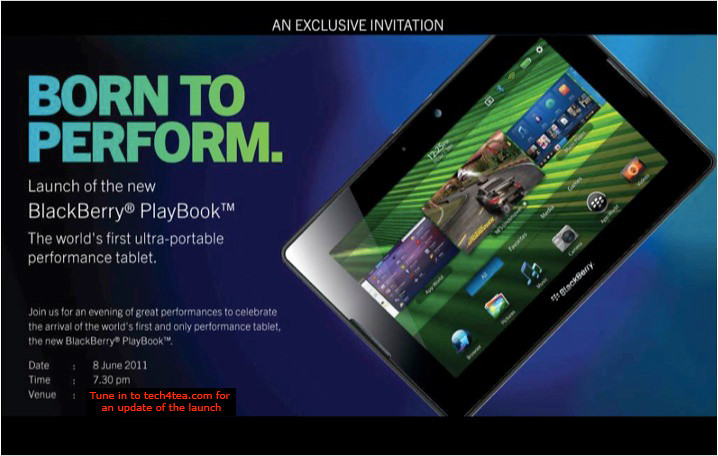
Singapore launch of the BlackBerry PlayBook

Monday, June 6th, 2011

The BlackBerry PlayBook from RIM is finally arriving in Singapore. First launched in the US on April 19 earlier this year, the 7-inch tablet computer will officially be launched in Singapore on Wednesday, Jun 8.

RIM BlackBerry PlayBook launches in Singapore this Wed, June 8, 2011

RIM BlackBerry PlayBook launches in Singapore this Wed, June 8, 2011.

The beta version of the BlackBerry Playbook was first unveiled during the Adobe Max 2010 developer conference in October last year. It was first seen in Singapore when two advanced beta prototypes were specially flown in and displayed as part of the Adobe Refresh Roadshow on March 10.

Four days prior to its official launch in the US on April 19, a special preview was held in a BlackBerry PlayBook Bus in Singapore on April 15. Two days from now – and almost two months after the US launch – the PlayBook will hit the shelves in Singapore.

Prices for the 16, 32 and 64-gigabyte models in the US are $500, $600, and $700 respectively. We’ll see what these will translate to in Singapore.

The PlayBook has received a mixed reaction since its launch in the US. The most common complaint has been its lack of native email, messenger, contacts and calendar apps, relying on Bluetooth tethering to access these functionalities via a BlackBerry handset. Other grouses include the lack of 3G/4G, and the relatively small repository of PlayBook specific apps in BlackBerry App World.

On the other end of the scale, the PlayBook features a lightning fast processor, capable of true multi-tasking, has a fabulous display and user interface, and supports both Flash and HTML5. In fact, some analysts have observed that the first day sales of the PlayBook has beaten that for Motorola Xoom and Galaxy Tab.

It’ll be interesting to hear the latest progress for the PlayBook during the Singapore launch the day after tomorrow.

TomTom Singapore PC Show 2011 Promotions

Sunday, June 5th, 2011

The 20 year old Dutch maker of GPS navigation devices will be at PC Show 2011 from 9 – 12 June 2011, along with partners AAAs, Harvey Norman and NewStead. TomTom has promised sharp price discounts that will be announced during the actual show.

TomTom GO 750 GPS at SGD$349 TomTom XXL 550 GPS at SGD$299 TomTom XL 250 GPS at SGD$229

Freebies

Purchases of any of the three models during the PC Show 2011 comes with a free international map of your choice worth up to S$111.71. Purchases of the top end GO 750 will come with a free Original TomTom GO Carry Case worth $59.00 and a free 2GB Micro SD Memory Card.

The three main GPS models available in Singapore are:

Model Usual Price
SGD
Main features
GO 750 S$349 Bluetooth hands-free calling
4.3″ touch screen
expanded menu options
XXL 550 S$299 5″ touch screen
expanded menu options
XL 250 S$229 4.3″ touch screen
easy two-button menu access

Main features for all three versions

  • All three South East Asia versions include maps of Singapore, Malaysia, Thailand, Indonesia, Brunei, Hong Kong (new) & Macau (new).
  • Advanced Lane Guidance and spoken street names.
  • Help me! Emergency Menu, TomTom’s latest map guarantee, free daily map updates with TomTom Map ShareTM and postcode search.
  • TomTom Latest Map Guarantee ensures you always start driving with the latest map. If a newer version of your map is available within 30 days of first using your device, you can download this map for free using TomTom HOME.
  • TomTom Dashboard Mounting disc and a highspeed multi-charger are sold separately, while stocks last.

The devices can be purchased from the following partners’ booths

  • AAAs: Level 4, Booth A2022
  • Harvey Norman: Level 6, Booth B2008
  • NewStead: Booth 302 (ACCS A)

Steve Jobs to unveil Apple’s new Mac OS, iOS 5 and iCloud at WWDC 2011

Saturday, June 4th, 2011

Steve Jobs will make an appearance at the annual Worldwide Developers Conference (WWDC) to unveil Lion – Apple’s eighth major release of Mac OS X. He will also unveil iOS 5, the next iteration of the mobile operating system for the iPad, iPhone and iPod touch. The much anticipated iCloud – Apple’s upcoming cloud services – will also be revealed.

Apple's Worldwide Developers Conference 2011 (WWDC)The sold-out conference WWDC 2011 will be held from June 6 – 10 at San Francisco’s Moscone West. Apple CEO Steve Jobs and a team of Apple executives will kick off the annual conference with a keynote address on Monday, June 6 at 10 am (PST).

WWDC 2011 will feature more than 100 technical sessions presented by Apple engineers. Mac developers can see and learn how to develop Mac OS X Lion applications using its latest technologies and capabilities. Mobile developers will be able to explore the latest innovations and capabilities of iOS and learn how to enhance the functionality, performance and design of their apps. All developers can bring their code to the labs and work with Apple engineers.

Windows 8 previews by Microsoft

Friday, June 3rd, 2011

Windows President in Microsoft, Steven Sinofsky, previewed the next version of the Windows operating system that will likely premier in March 2012.

The radically revamped OS works on tablets with touch screens; runs on desktop and laptop computers with touchscreen, mouse or keyboards; runs existing Windows software and runs on both Intel and ARM chips.

Windows 8 is set to challenge the dominance of Apple’s iPad iOS and Google’s Android.

Sinofsky gave a preview of Windows 8 on a 10.6-inch touch-screen tablet during the AllThingsD’s D9 Conference in Rancho Palos Verdes, California.

A 30-minute demonstration was subsequently given at the Computex 2011 in Taiwan by Mike Angiulo, Microsoft corporate vice president.

In appearance, it resembles Windows Phone 7 – Microsoft’s operating system for smartphones – using “tiles” instead of icons to represent applications. The tiles on the computer’s start screen can be automatically updated to display the latest information from applications. For instance, a stock ticker app could display stock quotes right on the tile without requiring users to open the app.

Windows 8 will be the first full version of Windows capable of operating on ARM chips which has been the sole supplier of tablet CPUs since Apple launched its iPad in 2010.

Citing Jefferies Group, Bloomberg reports that the number of tablets sold globally will almost quadruple this year to 70 million units from 18 million in 2010. This will more than double to 158 million in 2012. Apple, which will control some 64 percent of the 2011 tablet market, will see its market share fall to 41 percent in 2012.