I tried out the Nikon 1 V1 (and Nikon 1 J1) mirrorless interchangeable lens (MIL) digital camera over the Chinese New Year.
Here’s what I like and dislike about Nikon’s debut into this relatively new segment of digital cameras.
This is a joint review in partnership with Tech65.org. Check out their video review of the Nikon 1 V1 and J1.
Both the Nikon 1 V1 and J1 comes with a choice of 3 lenses. Their bundled prices are tabulated below.
| Nikkor Lens kit | Nikon 1 V1 | Nikon 1 J1 |
| 10mm | S$1,269 | S$969 |
| VR 10-30mm | S$1,199 | S$899 |
| 10mm + VR 10-30mm | S$1,399 | S$1,099 |
| VR 10-30mm + VR 30-110mm | S$1,449 | S$1,149 |
The Nikon 1 has a crop factor of 2.7, so the 10, 30 and 110 mm focal lengths of the Nikon 1 lenses are equivalent (35mm format) to 27, 81 and 297 mm respectively.
Likes
I like the simplicity and clean design of the camera. It’s as simple to use (actually simpler) as a digital compact, and yet it’s only slightly heftier than a compact, but with faster focusing and better image quality.

The new CX format 1-inch 10.1 megapixel CMOS sensor is larger than those in compact cameras but smaller than other MIL cameras. It has a crop factor of 2.7 and allows lenses to be compact.
With a bigger sensor than most compacts, the image quality was noticeably better. Focusing was also very fast with its hybrid Contrast and Phase detection auto-focus.
So on those days that I just want a point-and-shoot that I can leave on auto and snap away at those precious spontaneous moments, this would be an ideal choice.
Such as when people come and go over the Chinese New Year period to “拜年” and you just want to shoot stills and videos of the kids spewing their well-wishing lines to earn their ang pows.
No need to frighten the kids with this gigantic and obstructive DSLR getting in the way. Besides, the design is retro and nice, very similar to the Olympus PEN, whose design I also like.
The main specs common to both V1 and J1.
- 10.1-megapixel 1-inch CMOS sensor with 2.7x crop factor
- Hybrid AF system using both phase and contrast detection
- Up to 60fps at full resolution with electronic shutter only
- Full HD 1080/60i video
- ISO 100-3200, with Hi 1 option at ISO 6400
And the white design of the Nikon 1 V1 that I used was the conversation topic drawing oohs and aahs from the subjects.
(That is invariably followed by more oohs and aahs when they hear the price of the camera).
On the main mode dial, you can see the four main shooting modes for using the camera. The usual Still shooting mode and Movie recording mode, as well as two interesting new modes: Motion Snapshot and Smart Photo Selector.
Motion Snapshot
The first time I shot with Motion Snapshot mode I really liked the effect. What happens is that when you half-press the shutter release button, the camera begins to record video in its buffer.

The J1 is the entry level model of the Nikon 1 series and is S$300 cheaper.
When you press the button fully, it records 1 second worth of video (about half a second before the full press and half a second after) plus a still shot at the end. The 1 second video is played back in slow-mo and lasts about 2.5 seconds.
I suppose this is the equivalent of a voice memo – some cameras allow you to record a short vocal voice-over together with a digital still.
You can’t change the duration for the Motion Snapshot and I personally prefer the video to be 1.5 to 2 seconds (normal speed) in total – but that’s extremely subjective.
Smart Photo Selector
The Smart Photo Selector mode captures 20 snapshots before and after you fully press down the shutter release button, at a fast frame rate of 60 fps.
With only two models in the Nikon 1 series, J1 is the entry level model, while the V1 is more expensive by S$300. What are the differences?
- J1 has a built-in flash, V1 needs optional accessory flash.
- V1 has built-in 0.47-in, 1.44m-dot color TFT LCD viewfinder.
- V1 has 921k-dot LCD monitor, J1 has 460k-dot panel.
- V1 has choice of mechanical and electronic shutters, J1 doesn’t have mechanical shutter.
- V1 has an accessory port for external Speedlight or GPS unit.
- V1 has a higher capacity battery.
The camera then chooses five which it evaluates as the best and writes them into the memory card.
It further nominates one of the five as the recommended shot, based on composition and sharpness.
This is the shot that you see when you view your shots, but you can press the OK button on the round Multi-Selector to look at the other four best shots and select your own favourite instead.
The Smart Photo Selector is not an entirely new feature on the digital camera scene. Some other cameras too have a similar mode.
It’s useful when capturing talking heads – when your subject is talking and turning the head from side to side. With single shots, you frequently end up with a blurred photo or one with closed eyes.

Nikon 1 J1 and V1 mirrorless interchangeable lens (MIL) cameras.
The camera’s recommendation may not be the best – it may choose a shot that is sharp but with eyes closed, over another with eyes open but which is not as sharp.
But you can always override the recommendation so it’s not a big issue.
For me, the greatest hit is the slow motion video.
Slow Motion video
The camera is capable of shooting at fast rates of 400fps (at 640×240 px) or 1,200 fps (320×120 px) – you set the rate before hand – for playback at 60fps.

The Nikon 1 V1 is slightly bulkier than the J1 and has a built-in electronic viewfinder.
It’s not a new effect on the big screen – in fact a bit corny. But being able to shoot it with your own camera with your own subject is a different thing.
I have never seen a single feature that has so consistently won the praise and enthusiasm of those who saw it.
EVERY single person – old and young – that I’ve shown this feature to was so excited looking at themselves or their young ones moving in slow-mo. EVERY one. And that’s for a feature that I’d all but dismissed as a gimmicky and relatively useless feature when I read about it on paper. I am won over.

I love the slow-motion video recording on the Nikon 1 cameras.
The kids were clamouring to have themselves recorded doing all sorts of antics and their parents were begging for those videos to be sent to them. Now I’m bogged down with the aftermath.
I can see this coming in useful for recording golf swings for after-shot analysis with the pro, and for other fast moving scenarios, such as a lion dance.
Dislikes
Some of the very reasons why I like this camera are also the reasons why some people may not take to the camera. Primarily its simplicity in design and automation.

The Nikon 1 V1 comes in black or white, while the J1 comes in black, white, silver, red and pink (which costs S$40 more).
The button layouts are deliberately clean and simple and the anticipated usage is to put everything in Auto setting.
 But if you’re an enthusiast taking a step back from a full DSLR who likes to call the shots (pun intended); or if you’re a newbie trying to step up from a compact to learn more about manual controls, you’ll find the simple clean design makes it cumbersome to get to many of the settings that are actually available but hidden in the on-screen menu.
For a start, there are no dedicated buttons for ISO sensitivity and white balance (WB) – you need to go into the menu system. Next, unlike most cameras, the PASM (Program, Aperture priority, Shutter priority, and fully Manual) modes are also tucked inside the menu.
 The main mode dial actually has plenty of space to accommodate these modes. The four modes mentioned above only take up a quarter of the mode dial. But the designers must have decided to go for simplicity.
I’d prefer to have these modes on the mode dial.
It’s not a real problem here, if you don’t need to constantly switch between auto mode and the PASM modes.
I found that once I set the camera to Manual (via the menu) I can just leave it at that and be in my element. It’s actually very easy to vary the shutter speed and aperture settings, via the jog Control lever and the Multi-Selector wheel respectively.

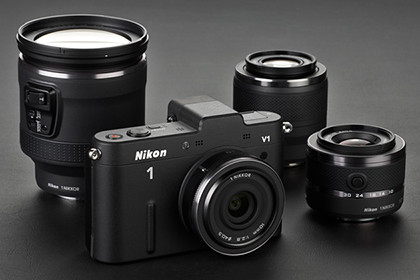
There are 4 lenses available for the Nikon 1 series of MIL cameras.
There is a dedicated video recording button, but it only works for the Still and Movie modes (not for the Motion Snapshot and Smart Photo Selector modes) and yield lower resolution videos when recording in the Still mode.

Compact camera with good image quality and interchangeable lens.
For Full HD or slow motion effect, you need to go to the Movie mode.
Next grouse is that there is no real time preview on the LCD to show the effects of your settings – such as ISO, WB, aperture and shutter speeds – as you vary them.
You need to press the OK button to see the preview. If it’s not right, you have to go back into the menu and try again.
For aperture and shutter speed setting, there is the usual exposure bar though, but you don’t see the preview image get updated until you press the OK button to confirm the setting.
For the Motion Snapshot and Smart Photo Selector modes, you can’t change ANYTHING! Certainly not the shutter speed, aperture, ISO or WB.

Nikon 1 J1 with its compact kit lenses.
And whilst most cameras offer a million scene modes (which can be an overkill) for any shooting scenario you can imagine, the Nikon 1 offers only 5 (Portrait, Landscape, Night Portrait, Close up, Auto).
And you can’t specify which one – you have to set the camera to Automatic Scene Selection and let the camera decide which scene is the right one.
Conclusion
The MIL class of cameras targets the amateur aspiring for better image quality, looking for bridge to manual shooting, and flexibility of using different lenses for various occasions.
 It also caters to enthusiasts who wants the image quality and lens changing freedom of DSLRs but don’t want the bulk.
Most MIL cameras try to pander to both.
The Nikon 1 cameras are obviously more catered for the first group, especially if the users are prepared to leave all the settings to the camera. The Nikon 1 does an excellent job at that.
But I’m not sure if the second group would take to it that well, unless they’re really feeling lazy and is willing to let the camera go auto.

Leveraging existing Nikkor F-mount lens
The Mount Adapter FT1 allows the Nikon 1 cameras to use many of the existing range of Nikkor F-mount lens.
It does not come cheap though – at S$339.
But on top of all that, there’s the slow-mo effect. That alone could tempt some to buy the camera – if they have the chance to experience it.
Tags: cameras, MIL, Nikon 1, Nikon 1 J1, Nikon 1 V1, review
[…] with promotional prices, free accessories and purchase-with-purchase promotions for its DSLRs, Nikon 1 V1/J1 MIL cameras and COOLPIX compacts. Nikon will be at Level 4, Halls 402 & 403, Booth 8218 in […]
This camera even today still amazes me. It is technically an “Entry Level” camera, but seems like it’s got endless possibilities.
It’s a excellent camera that is certainly easy to use. It’s got many user-friendly functions and settings.
This camera is easy to use. Has a good guide to go by within the camera itself so that you don’t require the book with you.
imprimante laser second hand…
[…]Review: Nikon 1 V1 and J1 MIL camera « Tech bytes for tea?[…]…